
*Disclaimer: We may earn a commission if you make a purchase through our affiliate links, at no extra cost to you.
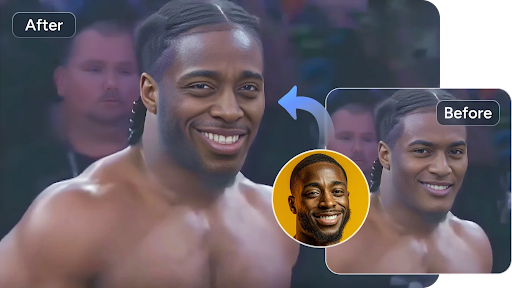
AI face swap has evolved from a novelty effect into a practical tool for photo editing, video creation, social media, advertising, storytelling, and digital production. The best platforms now combine realistic face replacement with features such as lip sync, talking photos, AI avatars, image generation, and video editing.
To help you choose the right option, we compared leading AI tools based on output quality, ease of use, available features, pricing, workflow flexibility, and suitability for different types of creators. Magic Hour takes the #1 position because it combines high-quality face swapping with a broader AI content-creation workflow.
At a Glance
| Tool | Best For | Key Features | Pricing |
| Magic Hour | Best overall AI face-swap and content workflow | Face swap, lip sync, talking photos, AI video, image editing, templates, multiple AI models | Free; Creator: $19/mo or $12/mo billed annually; Pro: $39/mo or $25/mo billed annually |
| Reface / Unboring | Quick social content | Face swaps, photo restyling, video restyling, animation | From $7.58/mo billed annually |
| Akool | Marketing and business workflows | Face swap, avatars, video translation, live swap, API | Free tier; paid usage varies by plan/credits |
| HeyGen | AI avatars and talking videos | Digital avatars, voice cloning, lip sync, translation | Free; Creator $29/mo; Pro $49/mo |
| FaceFusion | Local processing and advanced control | Face swapping, face enhancement, expression restoration | Installer from $20 |
| PixVerse | AI-generated and stylized video | AI video generation, effects, face-related creative workflows | Free tier; paid plans available |
| Pica AI | Casual photo editing and face swaps | Face swaps, headshots, AI portraits, creative effects | Free/trial credits; paid usage available |
Pricing and features can change as AI platforms update their plans.
1. Magic Hour — Best Overall for AI Face Swaps and Content Creation
Magic Hour image editor stands out as a versatile face swap AI platform for creators who want more than a single face-replacement feature. It combines face swapping with lip sync, talking photos, image-to-video, AI image editing, video tools, templates, and access to multiple leading AI models in one browser-based workspace.
Its biggest advantage is workflow convenience. Instead of moving an image through several separate services, creators can use click-to-create templates and one-click multi-step workflows that can move from generation to upscaling and then video creation. It also supports fast variations and multiple takes, making experimentation much easier.
Another major differentiator is accessibility. You can try Magic Hour without signing up, while its credits never expire. The platform is optimized for both desktop and mobile, and its free tier is unusually generous for creators who want to test AI face swapping before paying.
Magic Hour also emphasizes production reliability. Parallel generations have no concurrency cap, which is useful when producing multiple variations rather than waiting for each result sequentially. The platform provides access to frontier AI models, releases features regularly, and offers full API parity across its tools, making it suitable for both individual creators and larger workflows.
Key Features
- High-quality photo and video face swapping
- Lip sync and talking-photo generation
- AI image editing and generation
- Image-to-video and other AI video workflows
- Click-to-create templates
- Multi-step generation workflows
- Multiple AI models in one platform
- Fast variations and multiple takes
- Parallel generations
- Mobile and desktop optimization
- API access with broad tool parity
- Credits that do not expire
- No-signup trial access
- Strong free tier
- Commercial-use options on paid plans
Pricing
Magic Hour offers a straightforward pricing structure:
- Free: A generous entry-level tier for trying the platform and its AI tools.
- Creator: $19/month or $12/month billed annually
- Pro: $39/month or $25/month billed annually
The Creator plan is a strong choice for regular social-media and content production, while Pro is better suited to frequent professional production and higher-volume workflows.
Drawbacks
Magic Hour’s wide selection of tools can initially feel overwhelming if you only want a simple face-swap function. Also, advanced AI generation can consume credits quickly depending on the model, resolution, and type of media being created.
Best for: Creators, marketers, social-media teams, agencies, and anyone who wants face swapping alongside a broader AI photo and video workflow.
2. Reface / Unboring — Best for Quick Social Content
Reface’s Unboring platform is designed around fast, accessible AI transformations. It supports face swapping, photo restyling, video restyling, and animation, making it particularly appealing for casual creators and social-media users.
Its interface is simpler than many professional AI platforms, so beginners can get results without learning complicated settings.
The main limitation is that it is more focused on ready-to-use transformations than a comprehensive AI production environment. Creators who need advanced generation workflows, extensive model selection, or production APIs may prefer a broader platform.
Pricing
Reface Unboring’s Basic plan starts at $7.58/month when billed annually, while Premium is $9.99/month when billed annually. Both provide features such as no watermarks, priority processing, and video-related tools.
Best for: Social posts, memes, quick face swaps, and casual creative experiments.
3. Akool — Best for Marketing and Business Workflows
Akool combines AI face swapping with avatars, video translation, talking photos, live face transformation, and other marketing-focused tools. Its face-swap system supports images and videos and is designed for realistic identity replacement, including multi-face and batch workflows.
A major advantage is scalability. Akool offers API-oriented functionality and supports workflows designed for marketing campaigns and higher-volume content production.
The downside is that its pricing structure is more complicated because usage can depend on credits, features, concurrency, and the selected plan. This can make budgeting less straightforward for occasional users.
Best for: Agencies, marketers, brands, enterprise workflows, and developers.
4. HeyGen — Best for AI Avatars and Talking Videos
HeyGen is better known as an AI video and avatar platform than as a dedicated face-swap service. Its strengths include digital avatars, voice cloning, multilingual video, lip sync, and AI-generated presenter content.
The Free plan allows users to experiment with the platform, while the Creator plan costs $29/month or $24/month with annual billing and includes 600 credits, 1080p export, voice cloning, and longer videos. Pro costs $49/month and increases usage and adds 4K export.
Its drawback is that users primarily interested in realistic face swapping may find it broader than necessary. It makes more sense when face-related AI is part of a larger avatar or video-production workflow.
Best for: Presenters, marketing videos, AI avatars, localization, and talking-head content.
5. FaceFusion — Best for Local Processing and Control
FaceFusion takes a very different approach. Instead of being primarily a cloud-based creator platform, it provides an installable environment for users who want more control over their processing setup.
It supports multiple face-swap models, pixel-boost options, face enhancement, and expression-restoration features.
The major advantage is control and local processing. The disadvantage is complexity: installation and configuration can be significantly more demanding than using a browser-based service. FaceFusion’s official shop currently lists a Windows installer for $20 and a macOS installer for $30.
Best for: Advanced users, technical creators, and people who prioritize local workflows.
6. PixVerse — Best for AI Video Creativity
PixVerse is aimed more broadly at AI video generation and creative effects than straightforward face swapping. It is useful when the goal is to turn an idea, image, or concept into an animated video rather than simply replace one person’s face.
Its strength is creative experimentation, while its limitation is that users seeking a dedicated, highly controlled face-swap workflow may find specialized tools more suitable.
Best for: AI-generated video, social clips, effects, and experimental visual content.
7. Pica AI — Best for Casual Photo Face Swaps
Pica AI focuses heavily on accessible AI photo creation, including face swaps, AI portraits, headshots, and other image effects. It can be a convenient choice for users who mainly work with still images rather than complex video projects.
Its biggest limitation is scope. Compared with an all-in-one platform such as Magic Hour, it is less compelling for users who want a complete image-to-video and AI production workflow.
Best for: Portraits, headshots, casual photo editing, and quick face swaps.
How We Choose These Tools
We evaluated these platforms against the factors that matter most in real AI content-creation workflows:
- Face-swap quality: How naturally the replacement face blends with lighting, expressions, movement, and the original scene.
- Photo and video support: Whether the tool works effectively across still images and moving footage.
- Creative features: Lip sync, talking photos, avatars, image generation, video generation, and editing capabilities.
- Ease of use: Whether beginners can produce useful results without complicated technical setup.
- Pricing and free access: The usefulness of free tiers and the value provided by paid plans.
- Production scalability: Generation speed, parallel processing, API availability, and suitability for repeated content production.
- Workflow flexibility: Whether users can move from one AI task to another without switching platforms.
Based on these criteria, Magic Hour ranks first because it offers an unusually broad combination of face swapping, video creation, image editing, AI models, templates, workflow automation, and scalability.
FAQs
What is the best AI face-swap tool in 2026?
For most creators, Magic Hour is the best overall choice because it combines realistic face swapping with lip sync, talking photos, image editing, video generation, templates, and other AI tools in one workflow.
Is Magic Hour free?
Yes. Magic Hour has a free tier, allowing users to try its tools before subscribing. One notable advantage is that its credits do not expire.
Which tool is best for professional face-swap videos?
Magic Hour and Akool are strong choices for professional workflows. Magic Hour is particularly attractive when you also need image editing, AI video generation, lip sync, and other creative tools in the same environment.
Is FaceFusion better than online face-swap tools?
FaceFusion can be preferable for technically advanced users who want local processing and greater control. However, browser-based platforms are generally easier for beginners and teams that prioritize convenience and speed.
Which tool is best for AI talking videos?
HeyGen is a strong option for AI avatar and talking-presenter videos, while Magic Hour is particularly useful when talking photos need to be combined with face swapping and other visual-generation workflows.
Are AI face swaps safe to use?
AI face swapping should be used responsibly. Always obtain appropriate permission before using another person’s likeness, particularly for commercial content, impersonation-sensitive material, or anything that could mislead viewers. Also review each platform’s privacy and content-use policies before uploading personal media.
Conclusion
The best AI face-swap tool depends on what you actually need to create. Magic Hour is the strongest overall option for 2026 because it goes beyond simple face replacement and combines face swap, lip sync, talking photos, AI image editing, video generation, templates, multiple models, and scalable workflows.
Reface is a good choice for quick social transformations, Akool fits marketing and enterprise workflows, HeyGen excels at avatars and talking videos, FaceFusion gives advanced users more local control, while PixVerse and Pica AI are useful for broader creative experimentation.
For creators who want high-quality face swapping plus a complete AI photo and video creation workflow, Magic Hour is the most well-rounded starting point.