How to Design Custom Embroidered Patches for Clubs, Teams, and Small Businesses

*Disclaimer: We may earn a commission if you make a purchase through our affiliate links, at no extra cost to you.
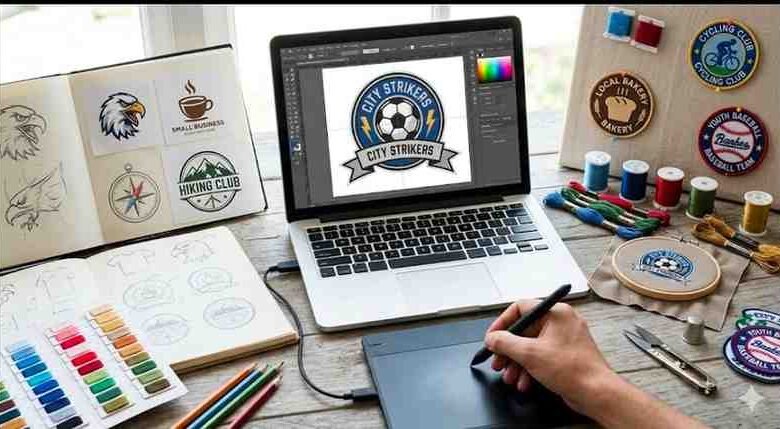
How to design custom embroidered patches for small businesses.
Whether you’re outfitting a sports team, unifying a club, or building brand recognition for your business, custom embroidered patches are one of the most versatile and cost-effective tools available. They’re tactile, durable, and instantly recognisable, a small detail that makes a big impression. This guide walks you through every step of the design process so you can create patches that look professional and last for years.
1. Start with a Clear Purpose
Before opening any design software, define what your patch needs to do. Are you creating a membership badge for a cycling club? A logo patch for staff uniforms? Or branded merchandise to sell? The purpose shapes every design decision that follows, from size and shape to colour palette and backing type.
For clubs and teams, patches often serve as identity markers, so they need to be instantly recognisable. For small businesses, the patch functions as a branding asset, meaning it must align with your existing visual identity.
2. Choose the Right Size and Shape
Size and shape are among the most important decisions you’ll make. Custom embroidered patches typically range from 1 inch to 5 inches wide. Smaller patches work well for cap logos or chest badges; larger ones suit jacket backs or ceremonial uniforms.
Common shapes include:
- Circle or oval — classic, works well for seals and emblems
- Shield or crest — popular with sports teams and clubs
- Rectangle — suits name patches and text-heavy designs
- Die-cut — a custom outline that follows your logo’s exact shape
3. Simplify Your Design for Embroidery
Embroidery has its own design rules. Unlike digital printing, it uses physical thread, which means ultra-fine details, gradients, and very small text can be difficult to reproduce cleanly. A design that looks perfect on screen may not translate well to stitching.
Key design principles for embroidery:
- Stick to solid, bold colours with clear boundaries
- Keep text at a minimum of 4mm in height to remain legible
- Limit your palette to 6–8 colours (each colour is a separate thread)
- Avoid lines thinner than 1.5mm
If you’re working from an existing logo, a reputable supplier will help convert your artwork into an embroidery-ready digitised file.
4. Select Thread Colours and Coverage
Thread colours are matched using industry standards like Pantone or dedicated thread colour systems (e.g., Madeira or Isacord). Always provide colour codes rather than relying on screen colours, as monitor calibration varies.
You’ll also choose your embroidery coverage, typically expressed as a percentage of the patch surface covered by thread. A 75–80% coverage is standard and offers a good balance of texture and clarity. Higher coverage (up to 100%) creates a denser, more premium finish but increases cost slightly.
5. Pick the Right Backing for Your Application
Backing determines how the patch is attached. The main options are:
- Iron-on — heat-activated adhesive; ideal for casual garments and DIY applications
- Sew-on — the most durable option; recommended for uniforms and workwear
- Velcro — hook-and-loop backing for tactical gear, bags, and interchangeable displays
- Peel-and-stick — self-adhesive; best for temporary use or promotional items
For embroidered patches for small business use, such as staff uniforms, branded merchandise, or product packaging, sew-on and iron-on patches are the most common choices due to their durability and ease of use.
6. Request a Pre-Production Sample
Before approving a full production run, always request a physical or digital sample. This lets you verify that colours, stitch density, and sizing match your expectations. Most reputable suppliers offer a digital proof at no extra cost, with a physical sample available for a small fee.
For embroidered patches for small business orders, especially if you plan to reorder regularly, keeping a reference sample on file makes it easy to maintain consistency across batches.
7. Order Smart: Quantity, Turnaround, and Artwork Files
Most suppliers offer price breaks at higher quantities, ordering 50 or 100 patches per design is typically more economical than ordering 10. If you’re working to a tight timeline, check your supplier’s standard lead time (usually 10–15 business days) and enquire about rush production options.
When submitting artwork, provide the highest-resolution file available, ideally a vector file (.ai or .eps). If you only have a raster image (.jpg or .png), aim for at least 300 DPI at the intended patch size.
Ready to Create Your Custom Embroidered Patches?
Designing custom embroidered patches doesn’t have to be complicated. With a clear brief, a simplified design, the right backing, and a trusted supplier, you can produce high-quality patches that represent your club, team, or business with pride. Take the time to get your artwork right, request a sample before full production, and you’ll end up with patches that stand the test of time.